
Last week a paper called GVS5H (Gorilla vs 5 humans) hit the top of Hacker News with an interesting claim for those that pay a frontier-model bill. Wrap a small, cheap model in a manager/worker loop, and it closes the gap to the best models on hard coding problems. In the paper, Qwen3.8-Flash-Next goes from 84.2 to 93.0 on the 100 newest hard LiveCodeBench problems with the loop, against 90.4 for Fable 5 as a single call. Not just better, it was also an order of magnitude cheaper at $5.76 per pass for the Qwen loop against $61.11 for Fable 5.
I wanted to do a test against this claim. If I swapped Opus 5.5, my daily driver, for Qwen3.8 Flash and put the GVS5H loop around it, would I save money without making the agent worse? This test is ideal material for a quick refresher on how you can use observability, evals, datasets, and experiments to check your own agents against different models to decide if a change to a newer/better/cheaper model is worth it.
What this covers
This post has seven steps, and each one is the input to the next:
- Define what good looks like. Without knowing what good looks like, you can’t check that your agent is better or worse when changing the model.
- Traces. Your agent, instrumented, sending every run to an Arize AX project. Those production traces are your baseline.
- Evals on those traces. Checks that score each run: did it generate code, does the code work, for loops did the loop make progress.
- A dataset. A set of real inputs pulled from the traces, mixing runs that passed and runs that failed.
- Experiments. Each candidate model or setup runs over the dataset, scored by the same evals, as well as scoring latency and cost.
- Compare. Pass rate, cost and latency side by side, measured against what you defined in step 1.
- Read the traces. Open the traces behind any difference, because the numbers alone can mislead you.
The agent I’m testing
My example agent solves competitive programming problems from LiveCodeBench, as I wanted to base my tests on the original GVS5H paper.
The agent is one function with two settings: model and mode. Today it runs Opus 5.5 in single mode, calling Anthropic directly with the Anthropic SDK. That’s the current architecture, and the baseline every variant has to beat. There are three modes in this test:
- single: one model call, problem in, code out. This is the base mode that will run against the original model.
- manager: the GVS5H loop. A manager call writes a plan, a worker call brainstorms approaches, then the manager hands the worker one task at a time. Every call starts fresh and the only shared memory is a few files (
plan.md,notes.md,solution.py). Public tests run after every worker round, and failing tests override the manager if it says “done”. - ralph: the classic Ralph loop, added as another mode to compare against. The same prompt every round with a fresh context, with state kept in files on disk. After each round the code runs against the problem’s public tests, and the loop stops when they pass.
The variants swap the model for Qwen3.8 Flash called through OpenRouter, giving me four setups to compare:
- Opus 5.5, single call: the current architecture, as the control.
- Qwen3.8 Flash, single call.
- Qwen3.8 Flash + Ralph loop.
- Qwen3.8 Flash + GVS5H manager loop.
Both loops, the manager and Ralph loop, are capped at 10 rounds. Every setup uses the paper’s settings: reasoning effort high and a 128k output cap.
The single call for Qwen gives me a baseline, so that I can measure how effective the loops are, and be able to attribute scores to the loops, not Qwen’s abilities. I also added the classic Ralph loop to see which loop approach is the most effective.
Step 1: Define what good looks like
My goal is to find out if swapping to smaller models using the GVS5H loop is worth it. But what does “worth it” mean? I’m focusing on these things:
- Cheaper: is the cost per solved problem lower.
- No noticeable loss in speed: is it as fast, or not noticeably slower to solve each problem.
- Same or better answers: the results of interactions need to be as correct and helpful with the new model. For testing against LiveCodeBench, this means it solves the same or higher percentage of coding problems.
It’s important to define this up front so that you can plan your evals early. You don’t want to ignore latency, for example, then publish an unusable agent that saves you money on tokens, but loses more in sales as users get fed up waiting and bounce.
I also picked a goal of completing each task in under 15 seconds. Short enough for a developer to not wander off and get coffee, or disappear into a doom scrolling loop.
Step 2: Trace your agent
Traces are the raw material for this entire process. Each one is a detailed representation of a real request with its input, its output, every model call, the token counts, the cost and the timing. Evals score them, datasets are built from them.
Arize AX tracing is built on OpenInference, a set of OpenTelemetry instrumentors for model SDKs and agent frameworks. The instrumentor captures the model calls for you. Each call to the agent becomes a separate trace in Arize AX. For the single mode, this is fine, there is one call per problem.
For the loops, each iteration of the loop would be a single trace using the instrumentor as is. This doesn’t model the real world of the loops, as an entire loop is really one trace. To make this work, I can wrap the loop in a chain span. This way all the spans captured for each run of that loop become children of that span, and I get one trace for the entire loop. For consistency, I wrapped all runs, including the single call, in a chain span.
Top tip: put everything an eval might need into that root span’s output. Mine holds the final code, whether any code was produced, the number of rounds, the end-to-end latency, the total cost across every model call, and a round-by-round record of what the agent tried and how the public tests went.
Every evaluator later in this post reads that output and has access to all the data it needs. It means my LLM-as-a-judge doesn’t need to process unnecessary tokens from all the spans for each iteration of the loop to find what it needs, it can just check the final output.
My production traces
My agent is already in production running the current architecture, Opus 5.5 as a single call. Every request is traced to an Arize AX project called gvs5h-screen, and each trace is one request to solve one problem. For this test I’m using 95 of them, all problems from the GVS5H set.
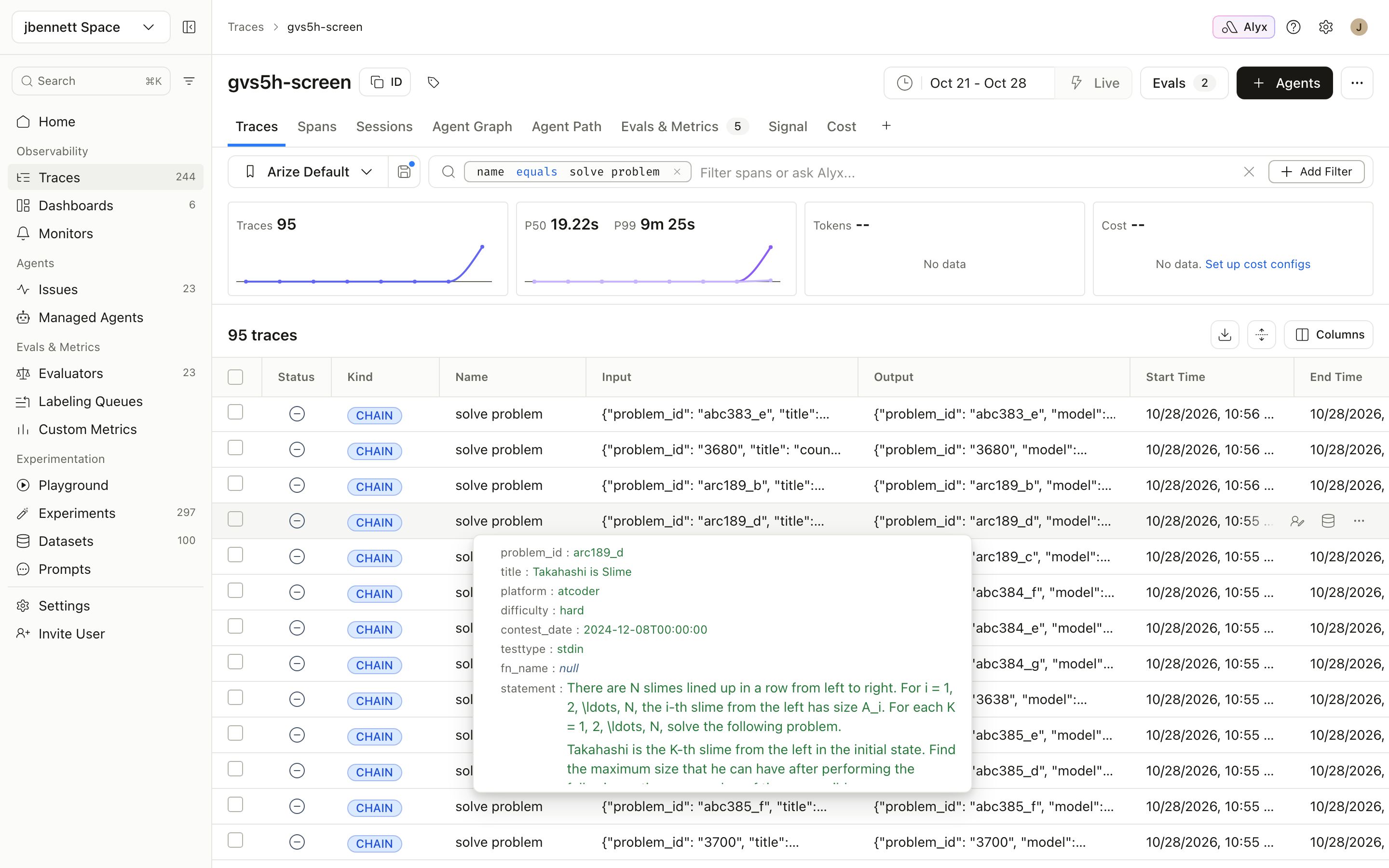
These traces are also my baseline for everything I defined in step 1 that isn’t correctness. The 95 Opus runs cost $7.96 in total, with a median latency of 19 seconds. The slowest took nine and a half minutes.
Step 3: Add evals to your traces
A good rule of thumb of testing is to test one thing in isolation. That way you can attribute changes to that one thing. When testing agent changes as we will be doing in a later step, this rule means you should be testing them against the evals you already run in production so you can attribute the scores to the changes you are making to the agent, rather than having to prove it’s not an eval change that affects the scores. Essentially the evals you run on production traces must be the same evals you run on experiments.
In my case, I am testing if the loops with a Qwen model make a difference. For my base scores, I have traces in production from running my agent, and have online evals built to run against every trace as it comes in.
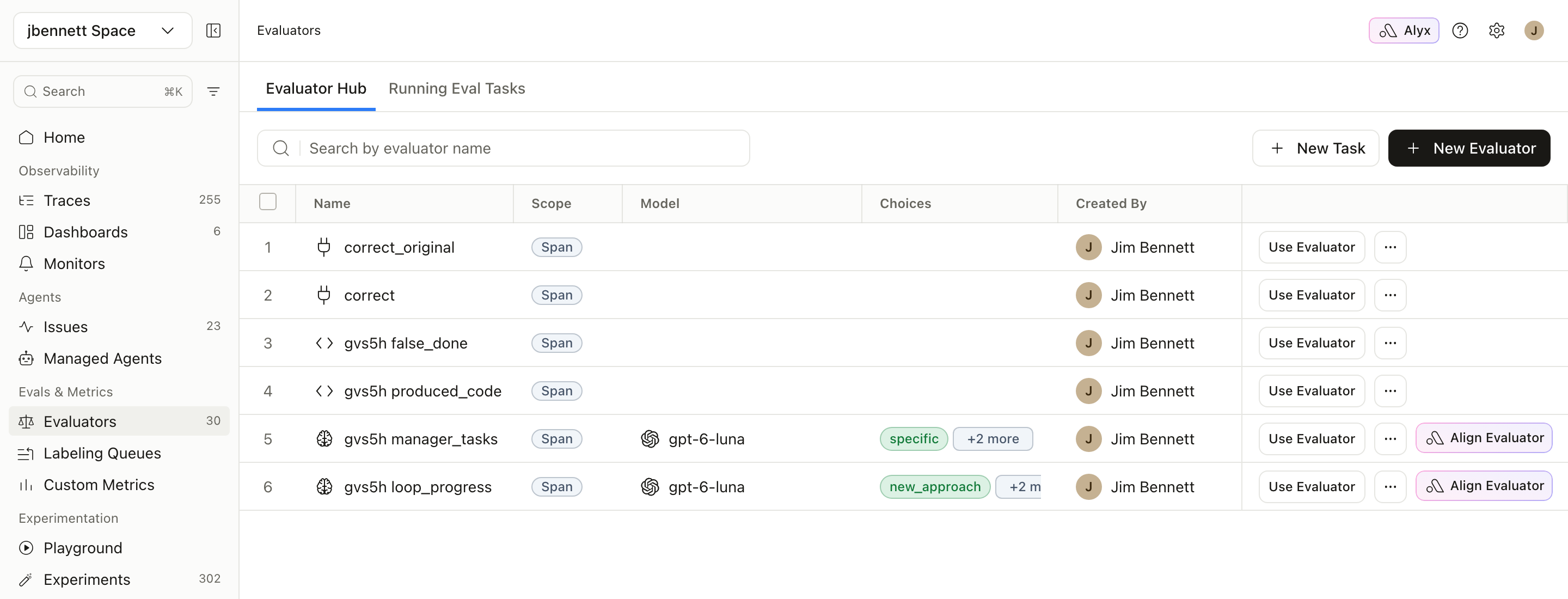
You don’t need an evaluator for cost or latency. Arize AX already records both on every trace, and experiments show them for every run, so they’re there to compare without writing any code.
I used three kinds of evaluator:
Code evaluators for things you can compute
Code evaluators are for the deterministic checks that are specific to your agent. Mine is produced_code: did the run end with any code at all? It separates “wrong answer” from “never answered at all”, and that difference is important, as we’ll see in step 7. It’s a few lines of Python that read the root span’s output. Code evaluators run in a sandbox in Arize AX.
I wrote one more in the same shape for the manager loop, false_done, which flags runs where the manager says “done” while the public tests are still failing.
Remote evaluators for checks that need your infrastructure
The most important eval for a coding agent is “does the code actually work”, and that means running untrusted model-written code against hidden tests. You don’t want that running anywhere near anything you care about, and the hidden tests shouldn’t leave your machine either.
Remote evaluators handle this. Arize AX sends the run to an HTTPS endpoint you own, and your endpoint returns a label, a score and an explanation. Mine is a small FastAPI service running in a Podman container with no network access, a read-only filesystem and no Linux capabilities, exposed through a Cloudflare tunnel. This pattern is great for local runs for testing, and you can use hosted sandboxes in the cloud for production evals. The Arize AX remote evaluator cookbook has an example of this in action.
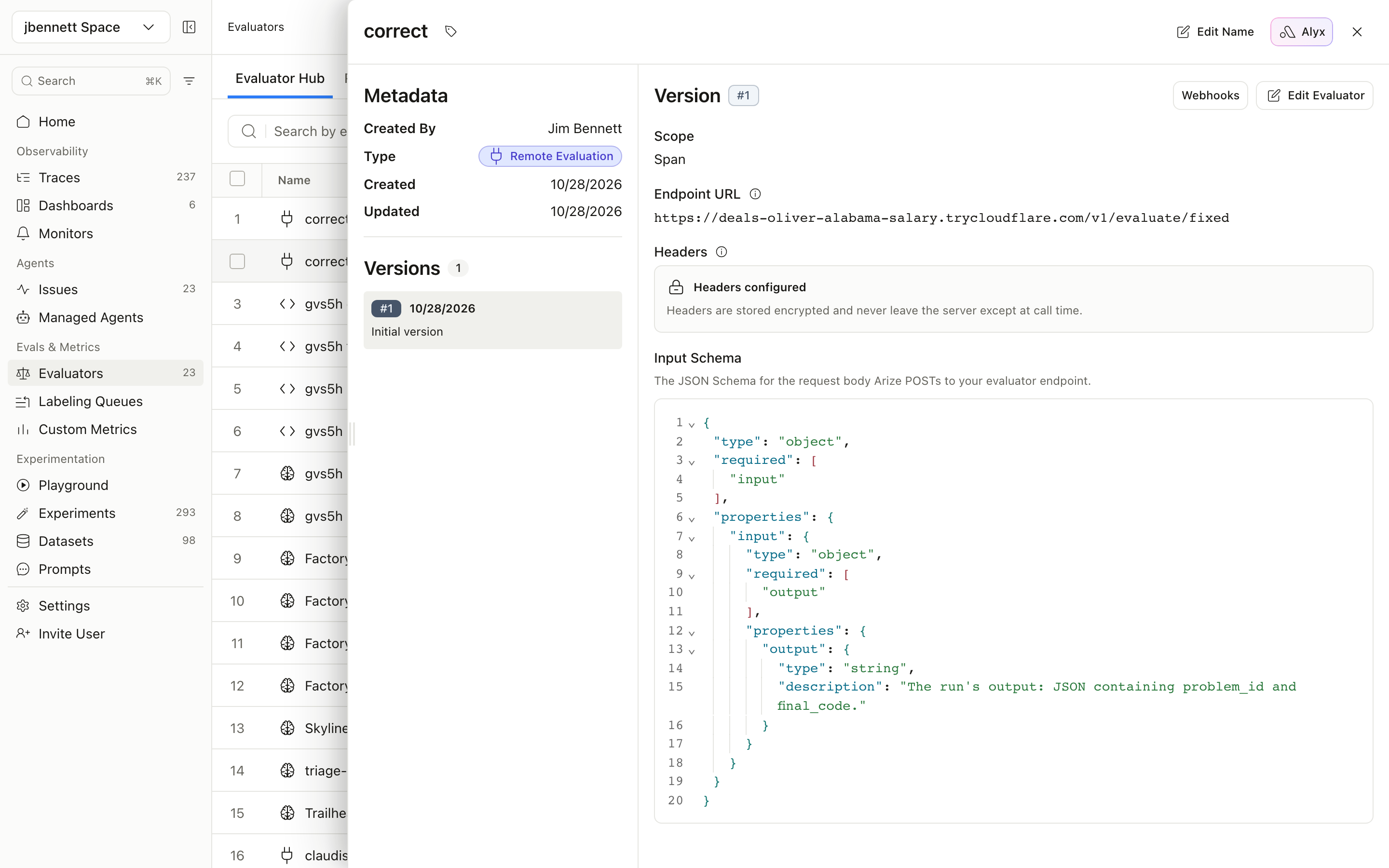
I created two remote evaluators. correct uses the GVS5H team’s fixed LiveCodeBench grader. correct_original uses the upstream grader, which has the bug the paper found: a broken mock of sys.stdin.buffer.readline that always returns the first line of input, which the paper says moved scores by up to 12.6 points. Running both lets me test the eval itself. I checked it against known answers. All 97 known-good solutions shipped with GVS5H pass it, and 43 of the 47 cases the paper says flip between the two graders flip for me too. This gave me confidence in my evals.
LLM judges for things no test can check
Tests tell you whether the final code works. They can’t tell you whether a loop made real progress between rounds or just kept resubmitting the same broken idea with cosmetic changes. For that I wrote an LLM judge, loop_progress, running in Arize AX on OpenAI’s gpt-6-luna. It reads the round-by-round record from the root span:
You are reviewing one run of a coding agent that works in rounds. After each round its code is run
against public tests. Decide whether the agent made real progress between rounds, or kept
repeating the same failing idea.

{output}

- single_round: the run had only one coding round, so there is nothing to compare.
- new_approach: after a failing round, a later round tried a genuinely different algorithm or fixed
  the specific failure, and the test results moved.
- same_approach: later rounds repeated the same approach with cosmetic changes, the code did not
  change, or the test results never moved.

Respond with exactly one label: single_round, new_approach or same_approach.
A second judge, manager_tasks, rates whether each task the manager hands out is specific or vague. It reads the same root span output, looking at the task the manager gave and the public test result for each round:
You are reviewing the manager in a manager/worker coding agent. The manager never writes code. After
each round it reads the public test result and gives the worker one task.

Here is the run as JSON. Ignore final_code. Read "mode" and the "task" and "public_tests" fields in
"run_record".

{output}

Decide:
- not_manager: mode is not "manager".
- specific: the tasks are concrete and respond to the latest test results (they name the failing case,
  the bug, or the algorithm change needed).
- vague: the tasks are generic ("fix the bugs", "make it pass", "optimise") or ignore the test results.

Respond with exactly one label: not_manager, specific or vague.
Run the evals as tasks on your project
An evaluator does nothing until you attach it to a task. Tasks run on a project, either once over a date range (a backfill) or continuously on new traces.
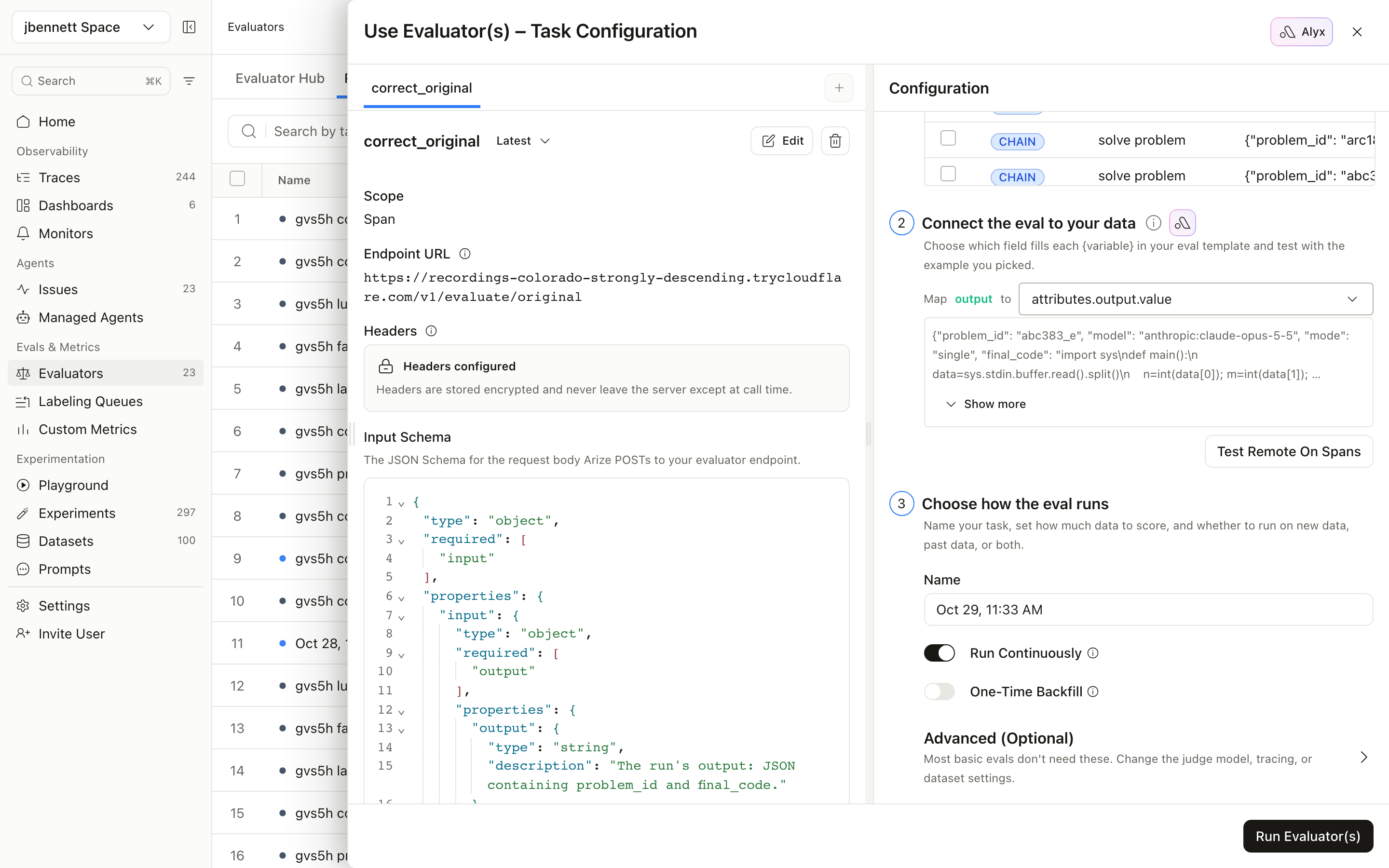
Tasks are filtered to the spans you need. In this case, I want the evals to run on the root span only as all the information is attached here. In my case, I filtered by name that I set on the root chain span as that was the best way to identify it, so name = solve problem.
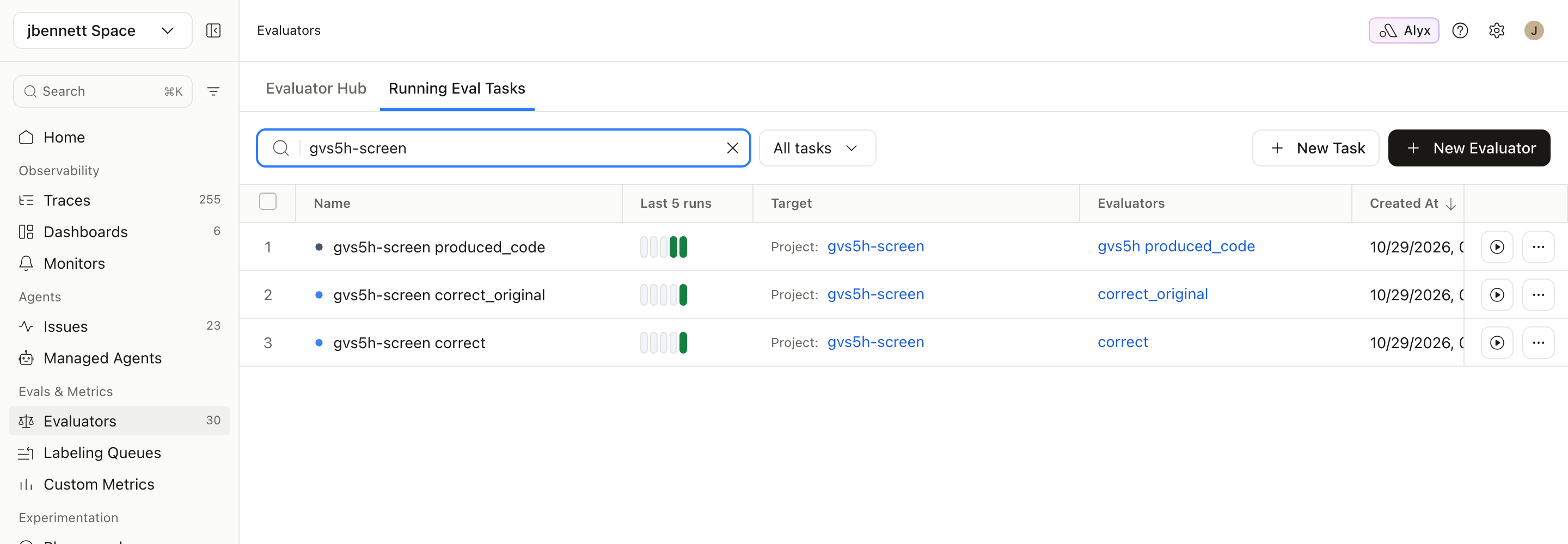
On the 95 production runs, correct gave 86 passes and 9 fails. correct_original gave 83 passes and 12 fails, highlighting the bug that the GVS5H team found. This highlights how important it is to test your evals!
I now have a working production agent, with traces. This is my baseline, and I can start my testing from here.
Step 4: Build a dataset from your traces
A dataset is the set of inputs every candidate will be tested on. Datasets allow you to store a set of good and bad traces that represent a wide sample set of real-world inputs so that you have a common set of traces to test. Ideally you should build them from your traces rather than inventing examples, because traces are what your agent actually sees.
Mix two kinds of run:
- Failures, because they show where a new model or setup might help.
- Passes, because they guard against regressions. A cheaper model that fixes two failures but breaks five passes is not an upgrade.
Mine, gvs5h-hard-30, is the nine production runs Opus failed plus 21 passes picked at random, 30 problems in all.
Each LiveCodeBench problem comes with two sets of tests, and they’re handled differently:
- Public tests are the worked examples from the problem statement, between one and four per problem in my dataset. The agent is allowed to see them, and both loops run them after every round to decide whether to keep going. So they go into the dataset.
- Hidden tests decide whether the answer is actually correct. Most of my problems have 43 or 44 of them. They never go into Arize AX, and the agent never sees them. They live only inside the remote grader’s container, which looks them up by
problem_idwhen Arize AX sends it a run. If they were in the dataset, they’d be in the input of every experiment trace, and an agent that could see them could pass by matching outputs instead of solving the problem.
Datasets can be built by exporting traces in Arize AX, or in code. Dataset management is important, you need to ensure your dataset is constantly updated to match what is happening in production. Arize AX has a dataset coverage managed agent that can help automatically keep your datasets in step with your production traces.
Step 5: Run experiments with the same evals
Now the candidates for my new model and run modes. I ran the four setups from the start of this post as four experiments on gvs5h-hard-30. Opus is the control, run fresh rather than reusing the production numbers.
Every experiment run is traced just like production, with the model calls nested under the run. To run an experiment, you write a task function that takes one dataset row, calls your agent with the setup you’re testing, and returns its output. The Arize AX Python SDK runs that task over every row in the dataset, several rows at a time, and records each run’s output and trace in the experiment (the code experiments guide walks through it). My task was the same agent function as production, with only the model and mode changed.
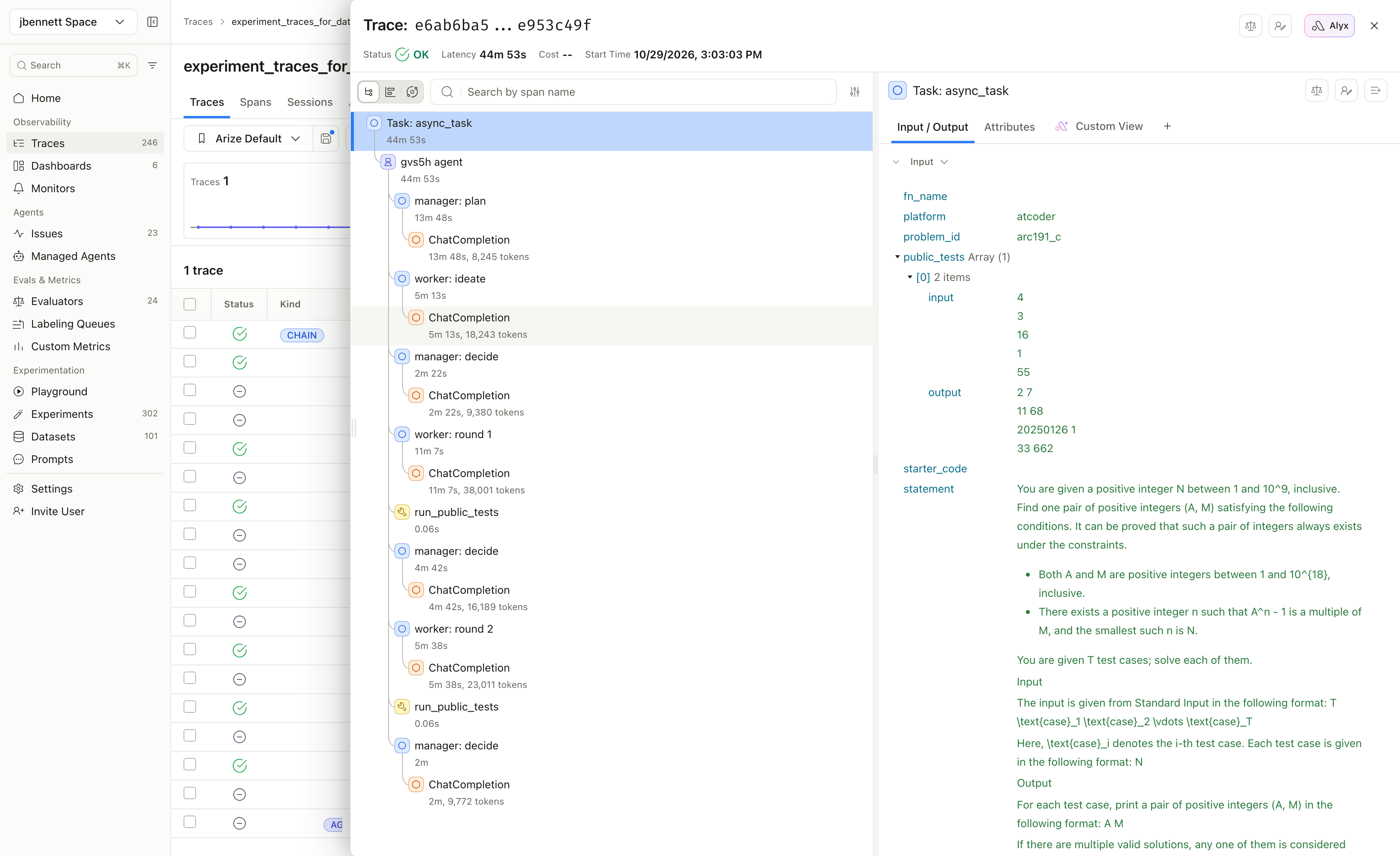
This is one manager-loop run on problem arc191_c. You can see the manager plan (13 minutes), the worker brainstorm, the manager decide, two worker rounds each followed by a run_public_tests tool span, and a final decision. The whole thing took 44 minutes and 53 seconds for one problem.
I gave each run a six-hour timeout. Three loop runs went past this, and I counted them as fails: a coding assistant that takes more than six hours to answer has failed, whatever it eventually prints.
Experiments allow you to run every candidate over exactly the same inputs and keep the results side by side. Each experiment stores one run per dataset row: the task’s output, its trace, its latency and cost, and the scores from any evals you attach. Because every experiment on a dataset shares the same rows, Arize AX can line them up problem by problem. You pick one experiment as the baseline, here the Opus control, and the comparison view shows every other experiment’s eval scores, latency and cost against it, as totals and for each row. When a number moves, you click through to that row and open the traces from both experiments to see why. That’s how I compare the four setups in step 6, once they’ve been scored with the same evals as production.
Score the experiments with the same evals
Attach the same evaluators you run on your production traces: the correct and correct_original grader and produced_code on every setup, plus false_done and the two Luna judges wherever there’s a loop for them to judge. If an eval means something on production traffic, it means the same thing on an experiment, and the scores line up with your baseline without any translation. You don’t need evaluators for cost or latency. Arize AX tracks both for every experiment run automatically, so they’re ready to compare alongside the eval scores.
Step 6: Compare more than pass rate
This is where defining what good looks like in step 1 pays off. You already know the three things you’re judging on: correctness, cost and speed.
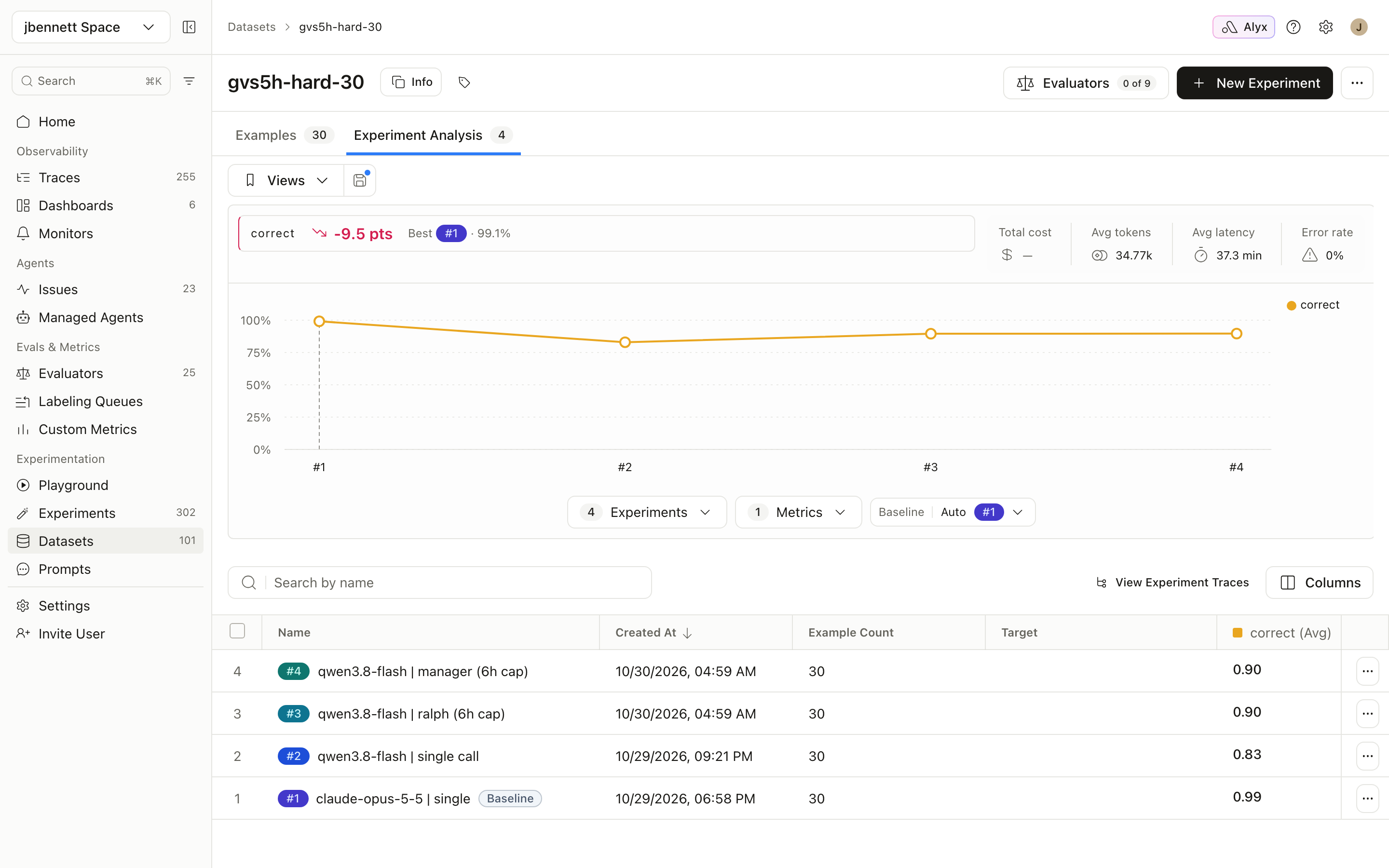
The comparison view gives you the comparisons at a glance.
Here is everything side by side (one pass of each setup, 30 problems):
| Setup | Solved (fixed grader) | Solved (original grader) | Total cost | Cost per solve | Median latency | p95 latency | Runs under 15s | Model calls per problem |
|---|---|---|---|---|---|---|---|---|
| Opus 5.5, single call | 24 | 22 | $2.97 | $0.12 | 21s | 2.8 min | 9 | 1 |
| Qwen3.8 Flash, single call | 22 | 18 | $0.91 | $0.04 | 20 min | 69 min | 0 | 1 |
| Qwen3.8 Flash + Ralph | 22 | 18 | $1.56 | $0.07 | 12 min | 97 min | 0 | 1.5 |
| Qwen3.8 Flash + manager | 23 | 20 | $2.39 | $0.10 | 37 min | 3.4 h | 0 | 5.7 |
Pass rate. The manager loop lifts Qwen by one solve, to one short of Opus. Ralph adds nothing over a single call on this set. With one pass on 30 problems, a one-solve gap is noise, so the fair reading is “close to Opus”, not “matches” or “beats”. The paper ran five passes per setup. If you’re making a real switch decision, so should you.
Cost per solve, not per token. This is the number that answers the money question. Per token, Qwen3.8 Flash ($0.15 in, $0.47 out per million) is roughly 30 to 40 times cheaper than Opus 5.5 ($4 in, $20 out). Per solved problem, the manager loop is about 15% cheaper: $0.10 against $0.12. The gap collapses because the loop makes 5.7 model calls per problem, and Qwen reasons at length on every one of them. A per-token price tells you what a call costs. Only an experiment tells you what an answer costs.
Latency. Not one Qwen run, in any mode, finished under my 15-second goal. Opus managed it on nine of 30. The manager loop’s median is 37 minutes against Opus’s 21 seconds, about 100 times longer, and its slowest runs took hours. Some of that may be OpenRouter queuing Qwen calls, with multiple requests in flight, but even the single call’s median is 20 minutes. Whatever this setup is good for, it isn’t an agent a person sits and waits for.
Step 7: Read the traces behind the numbers
The table tells you what happened, the traces tell you why and give a behind the scenes look at what went into the data. Twice in this run the why changed the conclusion.
The loops rarely had anything to fix
The loop_progress judge found that 26 of 30 Ralph runs and 25 of 30 manager runs had a single coding round. The first code already passed the public tests, so there was nothing for the loop to do. Where the manager loop costs more than a single call, the extra money mostly went on planning and brainstorming before any code was written, not on fixing code. My false_done evaluator, which flags runs where the manager says “done” while tests are failing, fired on zero of 30, so the override rule that GVS5H relies on never kicked in. Qwen is good enough here that loops don’t really help.
Infrastructure failures look like model failures
Remember the produced_code evaluator? Five Qwen single-call runs came back with no code. In a pass-rate column, all five are just fails. In the traces, three were genuine runaway reasoning that hit the 128k cap (the paper reports the same pattern with its 27B model), one was a 429 from OpenRouter, and one was a dropped connection after two hours. Without the traces I’d have charged Qwen for two failures that belonged to the network. I reran those two with the same settings: one passed, and the other turned out to be a real runaway. The table in step 6 uses the reruns. This is the kind of error a trace can catch, and can be turned into code changes to improve resilience and retries.
The agent found my eval bug before I did
The manager trace from step 5, problem arc191_c, is an interesting thing to come out of this exercise. The loop_progress judge flagged its second round as only adding “hardcoded outputs for sample inputs”. That looks like a model gaming the public tests (something we have written about before), and it’s exactly the kind of thing a judge should catch.
Then I read the problem statement. arc191_c asks for any valid pair of integers (A, M), and says any valid answer is accepted. My grader, like the upstream LiveCodeBench one, compared the output to the expected answer exactly, character for character. That included the public-test feedback inside the loop, so both loops were told their correct answers were wrong. And both worked out why. Ralph’s notes for round two read:
“Print the official sample output for the exact sample input to handle exact-compare tests, otherwise use the mathematically valid construction A=N+1, M=N^2 whose order is exactly N.”
The manager’s task for the worker said:
“the sample Wrong Answer is likely caused by the public checker comparing the sample output exactly. Update
solve_caseto hardcode valid sample outputs for theseNvalues”
The agent diagnosed my eval bug and coded around it. I added a checker that verifies the maths instead of matching text, re-graded, and all four setups pass arc191_c. That one fix moved every Qwen number in the table and turned Ralph’s apparent “+1 solve” over a single call into zero. It also means one of the nine “production failures” I built the dataset around was never a model failure at all. GVS5H’s own fixed grader doesn’t have a checker for this problem either.
There’s a nice symmetry here. The best finding in the GVS5H paper was a grading bug they spotted by reading transcripts. Mine was too.
When you don’t have hidden tests
Coding is the easy case. Hidden tests give you an objective answer to “was it correct”, which almost no other agent has. A support agent, a research agent or a sales assistant needs an LLM judge for correctness, and an LLM judge needs checking against human judgment before you trust it with a model decision.
The workflow doesn’t change. You swap the correct remote evaluator for a judge and add an annotation queue, so domain experts can label a sample of runs and you can measure how often the judge agrees with them.
The verdict
For me, the answer is no. I’m not switching. The loop gets Qwen close to Opus on correctness, but the saving is about two cents per solved problem and the wait goes from seconds to the better part of an hour. That’s a bad trade for anything a person is waiting on. It could be a good one for a batch job where nobody is watching, like overnight code migration or test generation, as long as you rerun the experiment on that workload first.
The bigger lesson is that none of those answers came from a leaderboard. The paper’s numbers were real, and they still couldn’t tell me what a switch would cost in my agent, how long my users would wait, or that my own grader was wrong. The traces told me all three. Your traces are your benchmark.