---
title: "Binding the Cognitive Services Android Speech SDK - Part 1, binding the library"
date: 2018-09-09
description: ""
---
As part of the [Microsoft Cognitive Services speech API](https://docs.microsoft.com/azure/cognitive-services/speech-service/?WT.mc_id=speech-blog-jabenn), there is a native Java Android SDK available as an `.aar` file. I wanted to use this in a Xamarin app, so I created a binding project for it.
The code for this is available [in my GitHub](https://github.com/jimbobbennett/SpeechSdkXamarinSample).
Binding an SDK is a four step process:
* Create the binding project with the relevant `jar` or `aar` file
* Make any necessary tweaks to the code or project to make it compile
* Make any required amendments to the code to make it into idiomatic C#
* Test it all out and fix up any issues
There are some great docs available on the basics for doing this at [docs.microsoft.com](https://docs.microsoft.com/xamarin/android/platform/binding-java-library/?WT.mc_id=speech-blog-jabenn), but each library is different and can have it's own unique challenges so I thought I'd write a few posts to highlight the steps I needed to take to bind the speech SDK.
In this first part, I'll show how to create a binding project, add the speech SDK `aar` file, and make everything compile. In the [second part](/blogs/binding-the-cognitive-services-android-speech-sdk-part-2-making-the-code-more-c-like) I'll show how to make the code more idiomatic C#, then in the [third part](/blogs/binding-the-cognitive-services-android-speech-sdk-part-3-java-8-fun) I'll show how to use it and fix up a nasty issue with the Android compiler and using jars created with the latest versions of Java.
## Binding the SDK
The first step was to create a binding project and add the `.aar` file. I followed the instructions in the [Xamarin docs](https://docs.microsoft.com/xamarin/android/platform/binding-java-library/?WT.mc_id=speech-blog-jabenn), creating a new Android binding project and adding the `client-sdk-0.6.0.aar` file to the `Jars` folder.
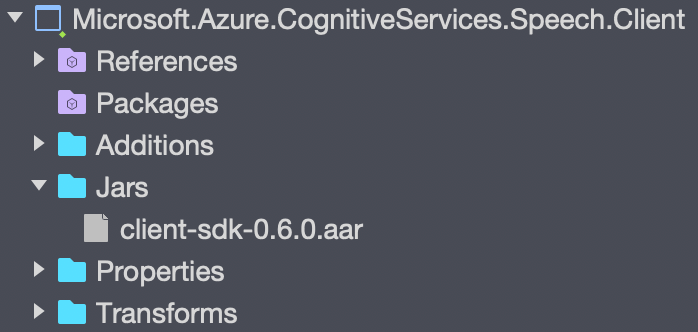
When you compile this project, the compile step will generate code to bind every Java class it finds. Each class in the generated code is a wrapper for a Java class - it doesn't re-implement the Java code, it instead creates the same kind of thin wrapper that is used by the Xamarin Android SDK bindings. If you want to see this generated code, you can find it in the `obj/${Congfiguration}/generated/src` folder.
## Making it work
After doing this, I compiled the library and hit a couple of compiler errors that I needed to fix up:
```sh
/.../Com.Microsoft.Cognitiveservices.Speech.Internal.StdMapWStringWString.cs(72,72): Error CS0738: 'StdMapWStringWString' does not implement interface member 'IIterable.Iterator()'. 'StdMapWStringWString.Iterator()' cannot implement 'IIterable.Iterator()' because it does not have the matching return type of 'IIterator'. (CS0738) (Speech)
```
```sh
/.../Com.Microsoft.Cognitiveservices.Speech.Internal.StdMapWStringWStringMapIterator.cs(83,83): Error CS0738: 'StdMapWStringWStringMapIterator' does not implement interface member 'IIterator.Next()'. 'StdMapWStringWStringMapIterator.Next()' cannot implement 'IIterator.Next()' because it does not have the matching return type of 'Object'. (CS0738) (Speech)
```
The reason for this is that the Xamarin Java SDK doesn't contain the generic versions of `IIterator` and `IIterable` which are used by this library, instead it will default to using the non-generic versions, and the implementation of the generic interfaces doesn't match the signature of the non-generic version. So - how can it be fixed?
### Metadata.xml and Additions
Inside the binding project you can both alter the generated code and add new code.
* `Transforms/Metadata.xml` - in this XML file you can alter the code that is generated. You can add entries to this file to remove some of the autogenerated code, either at class, method or property level. You can also change the generated code, for example changing the namespace - something especially useful to change from Java style namespaces to C# style.
* `Additions` - In this folder you can add code that is compiled into the final dll. Each autogenerated class is declared as `partial`, so not only can you add new classes and code, you can also add new parts to a generated class.
### Fixing the `StdMapWStringWString` code
The `StdMapWStringWString` class implements a generic version of the `IIterable` interface - `IIterable`. The Xamarin Java SDK doesn't contain the generic base interface, so the bound library defaults to implementing `IIterable`. The problem is this interface contains a method `Iterator` that returns a different type in the generic version to the non-generic version. The generated code implements this method returning a `StdMapWStringWStringMapIterator`, but the non-generic version expects a method returning `IIterator`, so you get a compiler error.
This is simple enough to fix - you just need to change the return type of the binding to be `IIterator`, and this can be done in the `Metadata.xml` file.
The `Metadata.xml` file is a file containing transforms that you want to make to the generated code - and can be adding new items, removing items or change the attributes of items such as the name or the return type.
Open the generated code from the `obj/${Congfiguration}/generated/src/` folder - the file will be called `Microsoft.Azure.CognitiveServices.Speech.Internal.StdMapWStringWString.cs`. If you look at all the public items in this file (the class, public methods and public properties), you will see each one has a comment describing the `Metadata.xml path`:
```cs
// Metadata.xml XPath class reference: path="/api/package[@name='com.microsoft.cognitiveservices.speech.internal']/class[@name='StdMapWStringWStringMapIterator']"
public partial class StdMapWStringWStringMapIterator
...
```
This path is used to identify each item to the `Metadata.xml` file, so locate the `Iterator()` method and note the `path`.
Open the `Metadata.xml` file and add a new `attr` node inside the `metadata` node. Set the `path` attribute of this node to match the path in the comment for the `Iterator()` method. Then add an attribute called `name` with the value `managedReturn` to tell the transformations that this is a changed to the managed return type - so the type for the binding library only. This will treat the underlying return value as the original type which is what you want. The value for this attribute is set inside the node, and should be `Java.Util.IIterator`.
The full node is shown below:
```xml
Java.Util.IIterator
```
Now if you compile the project, one error will be gone. If you re-open the generated file you will see the new return type.
You can read more on the capabilities if this file in the [docs](https://docs.microsoft.com/xamarin/android/platform/binding-java-library/customizing-bindings/java-bindings-metadata/?WT.mc_id=speech-blog-jabenn).
### Fixing the `StdMapWStringWStringMapIterator` code
The Xamarin Java SDK doesn't contain the generic version of `IIterator`, so the bound code uses the non-generic version. This interface has a `Next()` method that returns the next item from the collection being iterated. In the non-generic version of this interface, `Next()` returns a `Java.Lang.Object`, whereas in the generic version it returns the generic arg, in this case a `Java.Lang.String`. This means the generated code uses the non-generic interface, but the implementation uses the generic method, causing a compiler error.
The fix for this is a little bit more work - you can't just change the return type as it is used in a private method created by the binding. Instead, the fix for this is to remove the generic `Next()` method and replace it with a non-generic version. Re-writing binding methods is not easy as there is a lot of code in the binding, so for cases like this the best way is to copy the generated code, adjusting it to suit. If you open the `com.microsoft.cognitiveservices.speech.internal.StdMapWStringWStringMapIterator.cs` file from the `obj` directory, and look at the `Next()` method you will see the implementation consists of not just the `Next()` method, but also an `n_next()` method, a `GetNextHandler()` method and a `cb_next` `Delegate` field. This is all the plumbing needed to create the binding method and call through to the underlying Java method.
#### Adding the new method
Lets's start by adding the new method as this will mostly be a copy of the existing code. Add a new class to the `Additions` folder called `StdMapWStringWStringMapIterator`, mark the class as `partial` and change the namespace to match the generated file (these will be fixed up later to be more C#-like).
```cs
namespace Com.Microsoft.Cognitiveservices.Speech.Internal
{
public partial class StdMapWStringWStringMapIterator
{
}
}
```
Copy the `Next()`, `GetNextHandler()`, `n_next()` methods and the `cb_next` field from the generated code and paste them into the new class part. Strip out any unnecessary namespaces and use `var` everywhere - this will make it easier when you change the namespaces to be more C#-like in the next post.
Change the return type of `Next` to be `Java.Lang.Object` instead of `Java.Lang.String`. Leave the types in the `Register` attribute and `__id` fields as they are, as the underlying method that is called returns a `Java.Lang.String`, and you only need to change the return type for the binding wrapper.
In the `n_next()` method, change the `return` call to call `ToString()` on the result of the call to `Next()` to use the correct type. The final code will look like this:
```cs
namespace Com.Microsoft.Cognitiveservices.Speech.Internal
{
public partial class StdMapWStringWStringMapIterator
{
static Delegate cb_next;
# pragma warning disable 0169
static Delegate GetNextHandler()
{
if (cb_next == null)
cb_next = JNINativeWrapper.CreateDelegate((Func)n_Next);
return cb_next;
}
static IntPtr n_Next(IntPtr jnienv, IntPtr native__this)
{
var __this = Object.GetObject(jnienv, native__this, JniHandleOwnership.DoNotTransfer);
return JNIEnv.NewString(__this.Next()?.ToString()); // ToString called on the object.
}
# pragma warning restore 0169
[Register("next", "()Ljava/lang/String;", "GetNextHandler")]
public virtual unsafe Java.Lang.Object Next() // Return type changed from string to object
{
const string __id = "next.()Ljava/lang/String;";
try
{
var __rm = _members.InstanceMethods.InvokeVirtualObjectMethod(__id, this, null);
return JNIEnv.GetString(__rm.Handle, JniHandleOwnership.TransferLocalRef);
}
finally
{
}
}
}
}
```
#### Removing the `Next` method
To remove a method from the autogenerated file, you add a `remove-node` entry to the `Metadata.xml` file with the path of the `Next()` method node you want to remove. To remove the `Next()` method, add this following to this file:
```xml
```
The syntax is `` where the `path` comes from the comment in the generated code. Once this line has been added, compile the code and check the generated file in the `obj` directory. The compiler error about the missing `Next()` method will have gone, and the `Next()` method will be removed from the autogenerated file - when the library is built it will use the version in the file in the `Additions` folder.
You should now be able to compile this library successfully.
In the [second part](/blogs/binding-the-cognitive-services-android-speech-sdk-part-2-making-the-code-more-c-like/), I'll show how you can make the code more C#-like. You can find the code for this [in my GitHub](https://github.com/jimbobbennett/SpeechSdkXamarinSample), and you can read more on [docs.microsoft.com](https://docs.microsoft.com/xamarin/android/platform/binding-java-library/?WT.mc_id=speech-blog-jabenn)